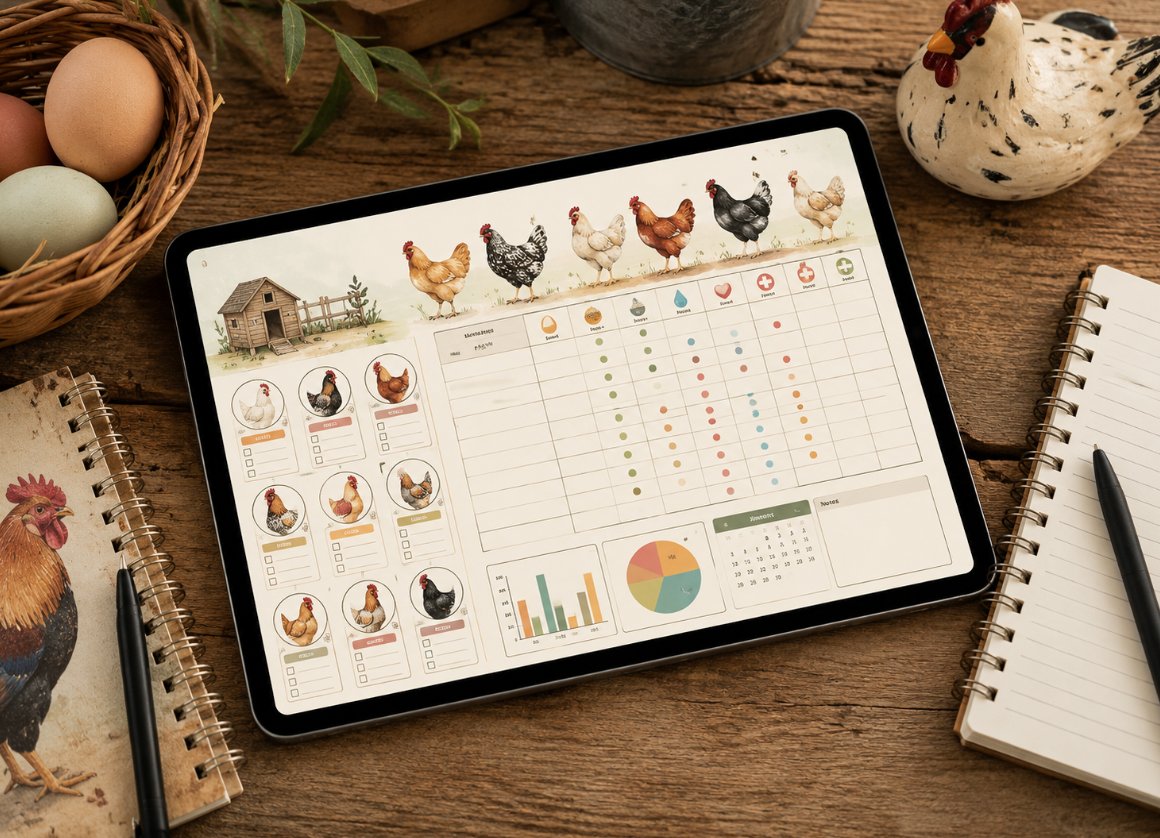
How to Create a Chicken Flock Tracker That Sells on Etsy
Keeping chickens can be surprisingly data-heavy. Between egg production, breeds, hatch dates, vaccinations, feed, health notes, expenses, and individual bird records, backyard poultry keepers can quickly end up with scraps of paper, phone notes, and spreadsheets scattered everywhere.
That is exactly where a well-designed chicken flock tracker can become more than a useful personal tool, it can become a sellable Etsy digital product.
The opportunity is not simply to make a spreadsheet and upload it to Etsy. Successful digital products solve a specific problem while being easy to understand, attractive, practical, and immediately useful. If you want to create a chicken flock tracker that sells on Etsy, you need to think like both a chicken keeper and a digital-product designer.
Here is how to approach it from idea to finished listing.
Start by Understanding What Chicken Keepers Actually Need
Before opening Excel, Google Sheets, Canva, or another design tool, think about the customer.
A backyard chicken owner may want to answer questions such as:
- How many chickens do I currently have?
- Which breed is each bird?
- When did I get or hatch each chicken?
- How many eggs did my flock produce this week?
- Which chicken is laying consistently?
- How much am I spending on feed?
- When was a bird vaccinated or treated?
- Which chickens have health concerns?
- How much does my flock cost compared with the eggs it produces?
A useful chicken flock tracker brings these details into one organized system.
The key is to avoid creating a product that is complicated simply because you can add more features. A beginner-friendly tracker can often be more attractive than an enormous spreadsheet with dozens of confusing tabs.
Choose the Right Format for Your Etsy Product
Your first major decision is the format.
A chicken flock tracker could be sold as:
Printable PDF
This works well for customers who enjoy writing by hand.
You might include pages for:
- Flock information
- Individual chicken profiles
- Egg production
- Health records
- Feeding schedules
- Expenses
- Breeding records
The advantage is simplicity. Customers download, print, and start writing.
The downside is that customers cannot automatically calculate totals.
Editable Spreadsheet
A Google Sheets or Excel chicken flock tracker can provide more functionality.
For example, customers could enter daily egg counts and automatically see weekly or monthly totals.
You can include formulas for:
- Total eggs
- Average daily production
- Monthly expenses
- Feed costs
- Flock size
- Cost per egg
This type of product can justify a higher price because it provides functionality rather than just attractive pages.
Printable + Digital Bundle
This can be an especially appealing option.
Offer both a printable chicken planner and a spreadsheet version. Xiaopan’s passive-income article directly covers specialized digital products, Excel/Google Sheets calculators, and the concept of selling digital products on platforms like Etsy and Gumroad. One customer may prefer handwriting while another may want automatic calculations.
The important thing is to clearly explain what is included so buyers know exactly what they are purchasing.
Build the Core Chicken Flock Tracker Pages
Once you know your format, decide what the tracker should actually contain.
A strong beginner-friendly product might include the following sections.
1. Flock Overview
Create a dashboard where customers can see basic information at a glance.
Include fields such as:
- Flock name
- Number of chickens
- Coop name
- Primary breed
- Start date
- Location
- Notes
If you are building a spreadsheet, you could also display the current flock count and monthly egg total automatically.
2. Individual Chicken Profile
This is one of the most useful sections.
Give every chicken its own record containing:
- Name or ID
- Breed
- Color
- Sex
- Hatch date
- Acquisition date
- Source
- Weight
- Notes
You could even add a small photo area in a printable version.
For example, a customer might have chickens named Daisy, Pepper, Luna, and Rosie. Instead of remembering which bird was purchased when, they can maintain a clear profile for each one.
3. Egg Production Tracker
Egg production is probably one of the most obvious reasons someone would use a chicken flock tracker.
Create a simple table for daily entries:
| Date | Eggs Collected | Damaged Eggs | Notes |
| Monday | 7 | 0 | Normal |
| Tuesday | 8 | 1 | Very hot |
| Wednesday | 6 | 0 | Rain |
For a spreadsheet, calculate weekly and monthly totals automatically.
This gives the customer something genuinely useful instead of simply providing a decorative worksheet.
Add Health and Care Records
Chicken keepers may need to track health observations over time.
A health section could include:
- Chicken name
- Date
- Symptoms or observation
- Treatment
- Medication
- Dosage
- Follow-up date
- Outcome
- Notes
Be careful with medical content, however. Your tracker should function as a record-keeping tool rather than presenting itself as veterinary advice.
A simple disclaimer can make the purpose clearer.
Include Feed and Expense Tracking
This is an opportunity to make your product more valuable.
Many flock owners want to know how much their chickens actually cost.
Create an expense tracker with categories such as:
- Feed
- Bedding
- Coop supplies
- Equipment
- Veterinary expenses
- Eggs or chicks purchased
- Repairs
- Miscellaneous
For example:
| Date | Category | Description | Cost |
| Sept. 2 | Feed | Layer feed | $24 |
| Sept. 4 | Bedding | Pine shavings | $12 |
| Sept. 10 | Supplies | Feeder | $18 |
A spreadsheet can automatically calculate monthly and annual spending.
Add Useful Automation Without Making It Complicated
If you create a digital chicken flock tracker, automation can make it feel significantly more valuable.
Xiaopan’s, How to Use AI to Plan Your Entire Month in Under 30 Minutes article discusses automation, task organization, tracking, and productivity workflows.
For example, a Google Sheets version could automatically calculate:
Monthly egg total = SUM of daily egg entries
You could also create a simple dashboard showing:
- Eggs collected this month
- Average eggs per day
- Total flock expenses
- Current flock size
- Egg production trend
But there is an important trade-off.
More automation means more formulas to test and more opportunities for customers to accidentally break something. Keep formulas protected where possible and provide a simple instruction sheet.
Make the Design Fit the Chicken-Keeping Audience
Functionality matters, but Etsy is highly visual.
Your chicken flock tracker should look like something a backyard chicken keeper would actually enjoy using.
Consider a clean farmhouse, rustic, homestead, cottage, or modern country aesthetic.
Use:
- Clear typography
- Plenty of white space
- Simple chicken illustrations
- Soft decorative elements
- Consistent headings
- Easy-to-read tables
Avoid filling every page with chickens, feathers, eggs, and decorative borders. Too much decoration can make a tracker harder to use.
Think: attractive enough to feel special, practical enough to use every day.
Create a Product That Solves a Specific Problem
One common Etsy mistake is trying to sell a generic planner to everyone.
Instead of simply calling your product “Chicken Planner,” consider positioning it around a specific customer need.
For example:
“Backyard Chicken Flock Tracker”
or
“Printable Chicken Egg Production & Flock Record Keeper”
or
“Chicken Keeper Spreadsheet & Printable Homestead Tracker”
These descriptions immediately communicate the product’s purpose.
Your product title, images, and description should answer the customer’s question: “What will this help me do?”
Create Etsy Mockups That Show the Product in Use
Your Etsy thumbnail can determine whether someone clicks.
Do not rely on one screenshot of a spreadsheet.
Create several product images showing:
- The complete tracker
- Individual chicken record page
- Egg production page
- Health record page
- Expense tracker
- Spreadsheet dashboard
- What files are included
- Instructions for accessing the product
Show the tracker on a tablet, laptop, clipboard, or printed pages where appropriate.
A customer should understand the product within a few seconds.
Test the Tracker Before Selling It
This step is easy to skip and can cause serious problems.
If you create a spreadsheet, enter fake information and test every formula.
Add 10 chickens.
Enter egg production for several weeks.
Add expenses.
Change dates.
Delete an entry.
Check whether totals still work.
For a printable product, print several pages yourself. Check whether text gets cut off, whether fields are large enough to write in, and whether the design remains readable in black and white.
A digital product may be downloaded hundreds of times. Small mistakes can quickly become customer-service problems.
Build a Helpful Etsy Listing
Your listing should be specific rather than overloaded with marketing language.
Explain:
- What the product is
- Who it is for
- What pages or features are included
- File formats
- Whether it is editable
- Whether it is printable
- How customers access it
- What software is required
- What is not included
If the product is a Google Sheets template, explain that clearly.
Don’t promise things your product does not do. Transparency reduces confusion and refund requests.
Research Similar Products Before Setting Your Price
Before choosing a price, examine competing Etsy listings.
Look at:
- Number of pages
- Spreadsheet functionality
- Design quality
- Bundled files
- Customer reviews
- Product presentation
- Pricing patterns
Do not automatically choose the lowest price.
A simple printable tracker may compete primarily on design and convenience, while a sophisticated spreadsheet can compete on functionality.
You could also create several versions:
- Basic printable tracker
- Complete chicken planner
- Digital spreadsheet
- Printable + spreadsheet bundle
This creates a natural product ladder.
Use Customer Feedback to Improve the Product
Your first version does not need to be perfect.
Pay attention to questions buyers repeatedly ask.
If several customers ask how to track broody hens, consider adding a breeding or behavior page.
If buyers struggle to edit a spreadsheet, improve your instructions.
If people love one particular page, create a larger bundle around that use case.
This is how a small Etsy digital product can develop into a broader product line.
Common Mistakes to Avoid
One of the biggest mistakes is creating a beautiful product that is difficult to use.
Other problems include:
- Tiny writing spaces
- Complicated spreadsheets
- Broken formulas
- Poor-quality preview images
- Unclear file instructions
- Too many unnecessary pages
- Weak product descriptions
- Overly generic titles
- No instructions for digital files
- Promising features that are not actually included
Remember that the customer is buying convenience. If they need a 20-minute tutorial just to understand the tracker, the product is probably too complicated.
A Simple Example of a Sellable Product
Imagine creating a product called “Backyard Chicken Flock & Egg Tracker.”
It could contain:
- 1 flock overview
- 20 individual chicken profile pages
- 12 monthly egg tracking pages
- Health and treatment log
- Feed tracker
- Expense tracker
- Hatch and breeding record
- Annual flock summary
- Printable instructions
- Editable spreadsheet version
Now the product is no longer just a spreadsheet. It is a complete record-keeping system for a specific type of customer.
That distinction matters.
Internal Linking Opportunities
If this article is published on a broader homesteading, productivity, or Etsy-focused website, natural internal links could point to related content using anchor text such as:
- “how to sell digital products on Etsy”
- “best Etsy digital product ideas”
- “how to create printable planners”
- “how to design Canva templates”
- “Etsy SEO tips for beginners”
These links should appear where they genuinely help the reader rather than being inserted simply for SEO.
For Etsy’s current seller guidance and marketplace policies, use the official Etsy Seller Handbook as an authoritative reference.
Final Thoughts
Creating a chicken flock tracker that sells on Etsy is less about making the fanciest spreadsheet and more about solving a real organizational problem.
Start with what chicken keepers need to record. Build a simple structure around flock management, egg production, health, feeding, and expenses. Then make the product visually appealing, test every feature, and present it clearly in your Etsy listing.
Most importantly, design for the person who will use the tracker, not for the designer who created it.
A product that saves a chicken keeper time, reduces confusion, and makes flock records easier to manage has a much better chance of becoming something people are willing to pay for.