Kubernetes vs Docker: Container Orchestration Compared
When Spotify moved its backend services off a homegrown deployment system and onto Kubernetes in 2018, the migration took years and touched thousands of services, not because Kubernetes is hard to install, but because it forces teams to rethink how workloads are packaged, scheduled, and healed.
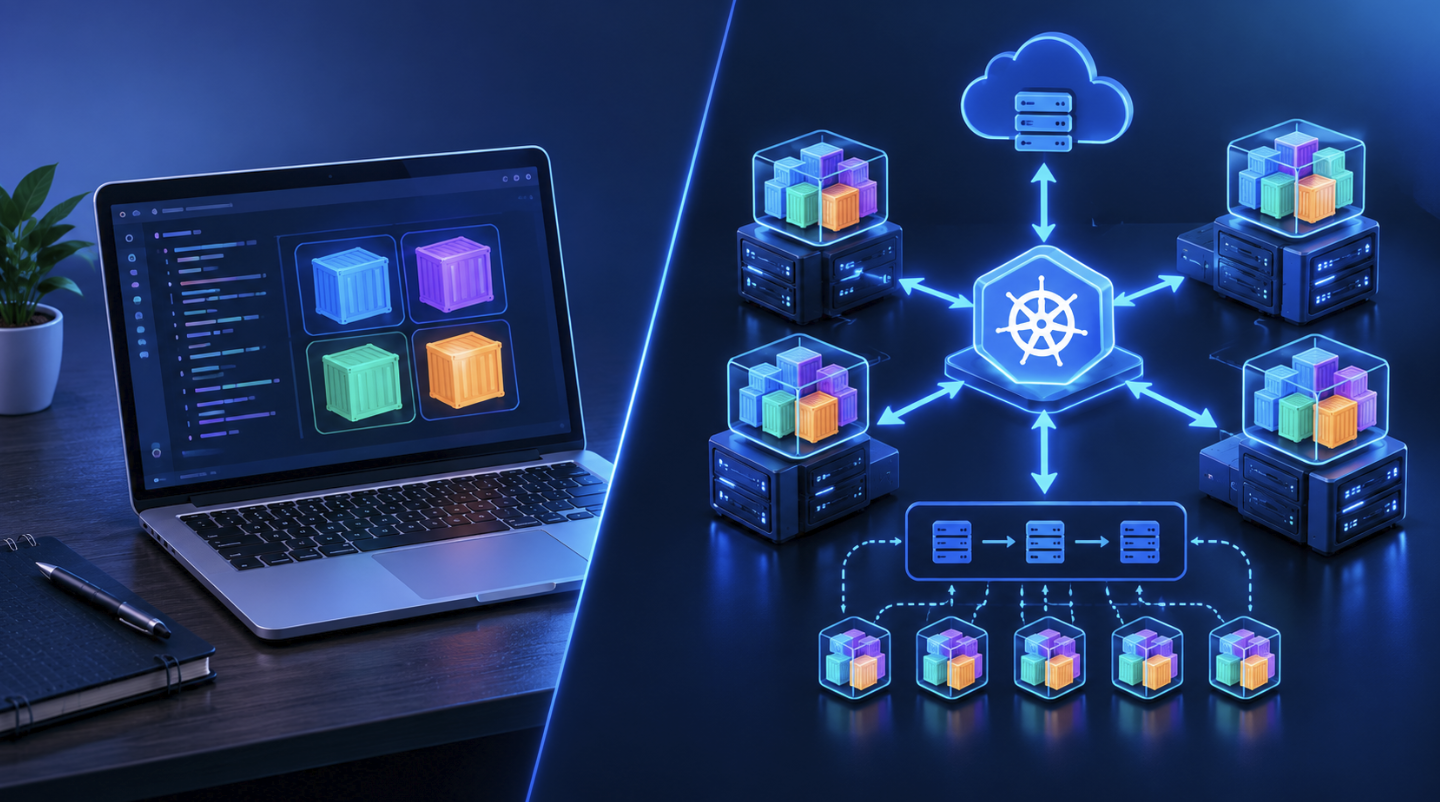
Docker, by contrast, was the tool that made the original services possible in the first place: a way to bundle an application with its dependencies into a single, portable image. The confusion between the two is common because they are often mentioned in the same breath, yet they solve different problems at different layers of the stack. Docker packages and runs a single container on a single host.
Kubernetes schedules, network, and manages fleets of containers across many hosts. Grasp where one ends and the other begins is the first step to using either one well.
Container Fundamentals: What Docker Does
Docker’s core contribution was making Linux namespaces and cgroups accessible through a simple CLI and a declarative build file. A Dockerfile describes a base image, the files to copy in, the dependencies to install, and the command to run on startup.
The docker build command turns that file into a layered image, where each instruction produces a new filesystem layer that can be cached and reused across builds. This layering is why rebuilding an image after changing a single line of application code is fast, Docker only rebuilds the layers after the change.
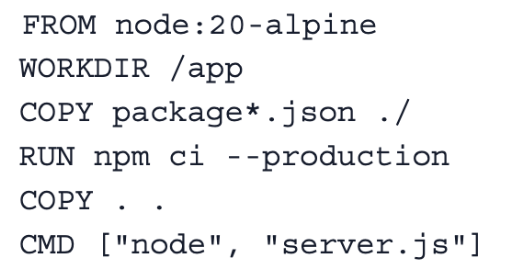
Once built, docker runs starts a container from that image, giving it its own filesystem, process namespace, and network interface, while sharing the host kernel. This is what makes containers lighter than virtual machines: there is no guest operating system to boot, just an isolated process tree.
Docker also includes Docker Compose, a tool for defining multi-container applications in a single YAML file, which is often enough for local development or small deployments involving a handful of services like an API, a database, and a cache.
What Docker does not do on its own is manage a container across a failure. If the host machine dies, or the container crashes and needs to move to a different node, Docker alone has no mechanism for that. It also has no built-in concept of a “cluster” of machines acting as a single resource pool, Docker Swarm attempted to add this, but it never reached the adoption level of Kubernetes.
Docker’s job stops at building and running containers correctly on a given host; everything above that, scheduling across many hosts, self-healing, rolling updates, and service discovery at scale, is a separate problem, and that is the problem Kubernetes was built to solve.
Orchestration Problems Kubernetes Solves
Kubernetes exists because running containers reliably across a fleet of machines is a fundamentally different problem than running one container on one machine. Once an organization has more than a handful of services and more than one host, several questions arise: which node should run which container, what happens when a node fails, how does one service find another, and how are secrets and configuration distributed without baking them into images.
Kubernetes answers all of these through a declarative model: you describe the desired state, three replicas of this container, restart on failure, expose port 8080, and the control plane continuously reconciles the actual state of the cluster to match it.
The scheduler is the component that decides which node a new pod should run on, based on resource requests, node capacity, affinity rules, and taints or tolerations. The kubelet on each node reports status back to the control plane and enforces what the scheduler assigns.
If a node goes offline, the controller manager notices the pods on it are no longer reporting and reschedules them elsewhere, assuming capacity exists. This self-healing loop is the core value proposition: engineers stop writing custom scripts to detect and recover from failures because the reconciliation loop does it continuously.
Kubernetes also introduces higher-level abstractions layered on top of raw containers. A Deployment manages a set of identical pod replicas and handles rolling updates, so a new version of an image can replace the old one gradually, pod by pod, with automatic rollback if health checks start failing.
A Service provides a stable virtual IP and DNS name for a set of pods, so other services do not need to track individual pod IPs, which change constantly as pods are rescheduled. ConfigMaps and Secrets externalize configuration and sensitive values from the image itself. None of these constructs exist in plain Docker, they are Kubernetes’ answer to the operational gaps that appear once a system grows past a single host.
Comparing Architecture: Docker Engine vs Kubernetes Cluster
A Docker Engine installation is a single daemon process running on a host, listening for API calls to build, start, stop, and remove containers. It maintains local state about the containers and images on that machine and nothing more. There is no leader election, no distributed consensus, and no concept of other machines unless Swarm mode is explicitly enabled, which most teams no longer do.
A Kubernetes cluster, by contrast, is a distributed system in its own right. The control plane consists of the API server, the single entry point for all cluster operations; etcd, a distributed key-value store holding the cluster’s entire state via the Raft consensus algorithm; the scheduler; and the controller manager, which runs reconciliation loops for Deployments and other resources. Worker nodes run the kubelet, which manages containers through a container runtime, historically Docker via a shim, now more commonly containerd or CRI-O directly.
This architectural difference has consequences. A single Docker host is easy to reason about and cheap to operate, but it is a single point of failure with no way to spread load intelligently across machines. A Kubernetes cluster requires more moving parts, etcd needs to be backed up and monitored carefully, since losing it means losing cluster state, but in exchange it tolerates node failures, rebalances workloads, and scales horizontally without manual intervention. Networking is also handled differently: Kubernetes requires a Container Network Interface plugin (Calico, Cilium, or the cloud provider’s native CNI) to give every pod a routable IP across the cluster, something Docker’s default bridge network does not need to solve.
Weighing Trade-Offs: Complexity vs Control
The honest trade-off is that Kubernetes buys operational power at the cost of conceptual and operational overhead. A team running a single API and a Postgres database for an internal tool gains very little from Kubernetes and pays for it in YAML sprawl, RBAC configuration, ingress controller setup, and the ongoing burden of patching and upgrading a cluster. Plain Docker, or a managed container service like AWS ECS or Google Cloud Run, gets that same team to production faster with far less to maintain.
The calculus shifts once a system has many services, needs to scale elastically, or requires resilience guarantees that justify the investment. Kubernetes’ declarative model becomes an asset rather than a burden when there are dozens of services with different scaling profiles, when deployments happen many times a day, and when the team has the headcount to own cluster operations, or is willing to offload that to a managed offering like Amazon EKS, Google GKE, or Azure AKS, which handle the control plane and reduce much of the operational surface.
There is also a learning curve cost that is easy to underestimate. Concepts like pod anti-affinity, resource requests versus limits, PodDisruptionBudgets, and the subtleties of readiness versus liveness probes take time to internalize, and getting them wrong produces failure modes that are harder to diagnose than a crashed Docker container, a pod stuck in CrashLoopBackOff because of a misconfigured liveness probe looks like a broken application on the surface, and distinguishing the two requires familiarity with `kubectl describe` output and event logs.
Common Migration Mistakes from Docker Compose to Kubernetes
Teams moving from Docker Compose to Kubernetes tend to repeat the same set of errors. The first is treating a Kubernetes Deployment as a one-to-one translation of a Compose service definition, without setting resource requests and limits. Compose has no concept of scheduling based on resource availability, so teams often skip this step in Kubernetes too, and the scheduler ends up either overcommitting a node, leading to CPU throttling or out-of-memory kills, or leaving excess capacity unused because pods were given no hints about what they need.
The second common mistake is neglecting liveness and readiness probes, or copying a probe configuration from a tutorial without adapting it to the actual application. A readiness probe that checks a path the application does not serve will mark every pod as never ready, and traffic will never route to it, producing a confusing outage that looks like a networking problem but is a probe misconfiguration.
The third mistake is underestimating storage. Compose volumes map cleanly to a host directory; Kubernetes requires grasping PersistentVolumes, PersistentVolumeClaims, and StorageClasses, and stateful workloads like databases usually need a StatefulSet rather than a Deployment, since StatefulSets provide stable network identities and ordered, graceful deployment and scaling that plain Deployments do not guarantee.
Fourth, teams frequently under-invest in observability during migration. A Compose setup running on one developer’s laptop is easy to debug with docker logs. A Kubernetes cluster with pods being rescheduled across nodes needs centralized logging and metrics from day one, or debugging production incidents becomes a matter of guesswork.
Finally, secrets management is often an afterthought, teams paste credentials into ConfigMaps meant for non-sensitive data, or leave default Kubernetes Secrets unencrypted at rest instead of adopting a tool like HashiCorp Vault, carrying over bad habits from a Compose .env file into a system where the blast radius of a leak is much larger.
Real-World Use Cases Across Company Scale
At a small startup running two or three services and a handful of background jobs, Docker plus a managed platform like Render, Fly.io, or AWS Fargate is often the right fit. These platforms accept a container image and handle scheduling and scaling behind a simpler interface, giving the team most of the operational benefit of orchestration without the responsibility of running a control plane. Kubernetes at this scale is frequently premature, the team spends more time managing the cluster than building the product.
A mid-sized company with twenty to fifty services, multiple environments, and a platform team of two or three engineers is the classic Kubernetes sweet spot. Shopify, for example, has documented running large portions of its infrastructure on Kubernetes to support wildly variable traffic during flash sales, relying on the Horizontal Pod Autoscaler to scale services based on CPU or custom metrics, and on cluster autoscaling to add nodes automatically when demand spikes. The declarative, GitOps-friendly nature of Kubernetes manifests also pairs well with tools like Argo CD, letting a small platform team manage deployments for a much larger number of application teams through pull requests rather than manual intervention.
At the largest scale, organizations like Google, where Kubernetes originated as the open-source descendant of the internal Borg system, and companies like Airbnb and Pinterest run thousands of nodes and tens of thousands of pods, using Custom Resource Definitions and operators to encode domain-specific operational knowledge into the cluster.
A database operator can automate backups, failover, and version upgrades for a stateful workload in a way that would otherwise require a dedicated on-call rotation. This extensibility is Kubernetes’ most durable advantage over Docker alone: it is not just a container runtime but a platform for building platforms.
Ecosystem Tools: Helm, Kustomize, and Docker Swarm
The ecosystem around each tool reflects its scope. Docker’s ecosystem centers on image distribution, Docker Hub, along with private registries like Amazon ECR, Google Artifact Registry, and GitHub Container Registry, and on Compose for local multi-container development. Docker Swarm still exists as Docker’s native orchestration mode, offering a simpler mental model than Kubernetes with built-in service discovery and load balancing, but its community and tooling investment has shrunk dramatically since Kubernetes became the de facto standard, and most teams evaluating orchestration today do not seriously consider it.
Kubernetes’ ecosystem is far broader because the platform is designed to be extended. Helm functions as a package manager for Kubernetes, letting teams template and version complex sets of manifests, a typical Helm chart for a web application might define a Deployment, Service, Ingress, and HorizontalPodAutoscaler as a single installable unit with configurable values. Kustomize takes a different, template-free approach, allowing teams to layer environment-specific overlays (say, different replica counts for staging versus production) on top of a shared base of YAML without a templating language, which many engineers find easier to reason about and diff in version control.
Beyond packaging, the CNCF landscape includes Istio and Linkerd for service mesh capabilities, Prometheus and Grafana for metrics and dashboards, cert-manager for automating TLS certificate issuance, and External Secrets Operator for syncing secrets into the cluster. This depth of ecosystem is both a strength and a tax: adopting Kubernetes means signing up to evaluate and maintain a stack of surrounding tools, whereas a Docker-only deployment has a much smaller surface area to keep current.
Practical Steps for Adopting Kubernetes Gradually
Teams that succeed with Kubernetes rarely migrate everything at once. A practical path starts by containerizing services with Docker first, if they are not already, and validating that each service runs correctly and statelessly in a container before introducing orchestration at all. This separates two sources of risk, “does this application work correctly in a container” and “does this application work correctly under Kubernetes scheduling”, so problems are easier to isolate.
Next, standing up a managed cluster (EKS, GKE, or AKS) rather than self-hosting the control plane removes an entire category of operational risk for teams without deep Kubernetes expertise on staff. Migrating one low-stakes service first, an internal tool or a background worker rather than the primary customer-facing API, builds team familiarity with kubectl, manifests, and the failure modes described earlier before anything critical depends on the cluster.
From there, investing early in observability and a GitOps deployment flow pays off disproportionately, turning “did the deployment work” from a manual check into an automated, auditable process. Setting resource requests and limits on every workload from the start, even conservatively, avoids the noisy-neighbor problems that erode early trust in the platform.
Finally, teams should resist adopting every CNCF project immediately, a service mesh, a custom operator framework, and a policy engine each add value in the right context, but bolting all of them onto a cluster early multiplies what can break while the team is least equipped to debug it.
Final Thoughts
Docker and Kubernetes are not competitors; they operate at different layers and most production Kubernetes clusters still run Docker-built, OCI-compliant images under the hood. The decision that matters is not “Docker or Kubernetes” but “how much orchestration does this system need right now.”
Small, simple deployments are often better served by Docker alone or a managed container platform, while systems with many services, elastic scaling needs, and dedicated platform ownership benefit from Kubernetes’ self-healing and extensibility.
The teams that adopt Kubernetes most successfully treat it as a deliberate investment tied to real operational needs, not a default choice made because it is the industry standard.
Frequently Asked Questions
Do I need Kubernetes if I already use Docker?
Not necessarily. Docker alone, combined with a managed container platform like AWS Fargate or Google Cloud Run, is often sufficient for a small number of services without complex scaling or scheduling needs. Kubernetes earns its complexity once you have many services, need automated scaling and self-healing across multiple hosts, or want a consistent platform for many teams to deploy against.
Can Kubernetes run without Docker?
Yes, and as of Kubernetes 1.24, it does by default. The dockershim that let Kubernetes talk to the Docker Engine was removed, and clusters now use containerd or CRI-O directly through the Container Runtime Interface. Docker-built images still work fine, since they follow the OCI image standard that these runtimes also support.
Is Docker Swarm still worth learning?
For most teams, no. Swarm is simpler than Kubernetes but has a shrinking community, fewer managed offerings, and far less third-party tooling. It remains a reasonable choice for very small deployments that want basic orchestration without Kubernetes’ learning curve, but it is not a growth path toward the broader cloud-native ecosystem.
What is the biggest operational risk in running Kubernetes yourself?
etcd. It holds the entire cluster state, and losing it or corrupting it can mean losing the ability to manage the cluster at all. Most teams are better served by a managed control plane from a cloud provider, which handles etcd backups, upgrades, and high availability as part of the service.
How much does Kubernetes cost compared to plain Docker deployments?
Kubernetes itself is open source and free, but the infrastructure to run a cluster reliably, multiple nodes for high availability, a managed control plane fee on most clouds, plus the engineering time to operate it, makes it more expensive than a single Docker host or a serverless container platform for small workloads. The cost becomes proportionally smaller as the number of services and the scale of traffic grow.
Should a startup use Kubernetes from day one?
Generally not. Early-stage startups benefit more from shipping quickly than from orchestration sophistication. A simpler platform like Render, Fly.io, Heroku, or AWS App Runner gets a product to market faster, and the migration to Kubernetes later, once traffic and team size justify it, is a well-trodden path with plenty of prior art to follow.