
Server Firmware Management: The Smart Strategy for Safer Updates and Zero Compatibility Surprises
A server can run flawlessly for years, then fail after one poorly planned firmware update. That risk makes firmware management far more important than simply installing the newest release. Firmware controls essential hardware functions behind your operating system and applications. Therefore, even a small firmware change can affect an entire server environment. A successful update can improve stability, security, performance, and hardware support. However, an unsuitable update can trigger crashes, connectivity issues, boot failures, or unexpected downtime.
Fortunately, businesses can reduce these risks with a disciplined firmware management strategy. Instead of rushing toward every new release, IT teams should manage firmware through planning, testing, deployment, and verification.
This approach creates a reliable balance between security and operational stability. More importantly, it helps organizations avoid turning routine maintenance into an expensive outage.
What Is Server Firmware Management?
Server firmware management covers the complete process of controlling firmware across physical server hardware. It includes discovering installed firmware, checking available versions, evaluating compatibility, testing updates, and deploying approved releases. The process also includes documenting changes and verifying systems after deployment. Firmware commonly exists inside several important server components. These components include BIOS or UEFI, RAID controllers, network adapters, storage controllers, and management controllers.
Disk drives, host bus adapters, power systems, and accelerator devices can also contain firmware. Each component can have different release schedules and compatibility requirements.
Therefore, administrators need more than a simple update checklist. They need visibility across the entire hardware environment.
Why Server Firmware Updates Need Careful Planning
Firmware interacts closely with other layers of the technology stack. For example, a controller firmware update may depend on a particular driver version. Similarly, BIOS changes can affect operating system behavior or virtualization features. Consequently, an update that looks harmless can produce unexpected results. Compatibility problems commonly appear when administrators install firmware without checking dependencies. They may also occur when teams mix different firmware versions across identical servers.
Another common problem involves updating hardware without considering the installed operating system or hypervisor.
Additionally, some firmware packages require specific prerequisites before installation. Therefore, checking vendor documentation should always happen before deployment.
How to Build a Reliable Firmware Inventory
Accurate inventory forms the foundation of effective firmware management. First, identify every server model and hardware configuration within your environment. Then record the firmware version for each critical component. Your inventory should also include operating system versions, hypervisors, drivers, storage configurations, and management tools. This information creates a clear baseline for future updates. It also helps administrators identify inconsistent firmware versions across similar systems.
For example, two servers may appear identical while using different RAID controller firmware. That difference could explain why one system experiences an issue after a driver upgrade.
Therefore, detailed inventory information can significantly improve troubleshooting and change management.
How to Check Firmware Compatibility Before Updating
Never assume that the newest firmware release suits every server. Instead, identify the exact server model, generation, component, and hardware revision. Next, review the manufacturer’s compatibility documentation for the proposed firmware. Pay close attention to supported operating systems and hypervisors.
Also check required driver versions, minimum firmware versions, prerequisites, and known limitations. Release notes can reveal important information that product pages may not explain. Some updates also require specific installation sequences.
Others may change configuration behavior or introduce new dependencies. Therefore, administrators should understand the complete update path before making changes.
Why Firmware Baselines Matter
A firmware baseline defines the approved firmware versions for a particular server group. It gives administrators a consistent target across comparable systems. For example, a company might maintain one baseline for virtualization hosts and another for database servers. This approach prevents random firmware versions from spreading throughout production infrastructure. It also makes compliance checks easier. When a server differs from its approved baseline, administrators can investigate the reason.
Centralized management platforms can further simplify baseline monitoring across larger environments.
However, teams should still validate vendor recommendations before applying a baseline broadly.
Why Testing Firmware Outside Production Is Essential
Testing provides one of the strongest protections against unexpected firmware problems. Whenever possible, select a representative non-production server for initial deployment. The test server should closely match the production hardware and software configuration. After installation, perform practical validation rather than checking only the firmware version. Test operating system stability, storage access, networking, virtualization, monitoring, and remote management. Also check application behavior if the server supports important workloads. A successful test provides greater confidence before production deployment.
However, testing does not eliminate every risk. Production environments can contain different workloads, traffic patterns, or hardware combinations.
Therefore, administrators should compare production systems against the tested configuration before continuing.
How Maintenance Windows Reduce Firmware Risks
Firmware updates can require reboots or temporarily interrupt hardware availability. Consequently, organizations should schedule updates during controlled maintenance periods. Choose a window that minimizes business disruption. Before the window begins, verify backups and recovery procedures.
Also confirm remote management access and required firmware packages. Notify affected teams before starting the maintenance activity. Additionally, prepare a rollback strategy for supported scenarios.
A maintenance window should never become a period of improvisation. Every important step should already have an owner and clear recovery procedure.
Should Firmware and Drivers Be Updated Together?
Firmware and drivers often depend on each other. Therefore, administrators should evaluate them as a coordinated compatibility set. However, updating every driver after every firmware release is not always necessary. Instead, follow the manufacturer’s compatibility matrix and release guidance. Some environments require specific driver versions alongside particular firmware versions. Other systems may operate correctly without simultaneous driver changes.
Blindly updating multiple components can increase the number of variables during troubleshooting.
Therefore, coordinated updates should follow documented compatibility requirements rather than assumptions.
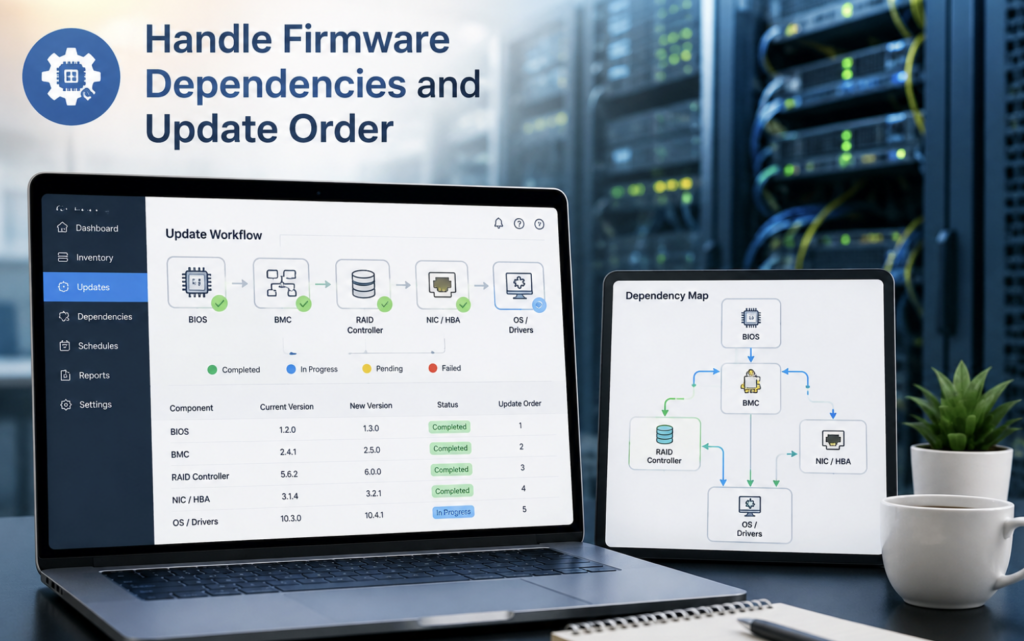
How to Handle Firmware Dependencies and Update Order
Firmware dependencies deserve special attention in complex server environments. One component may require another component to reach a minimum version first. For example, a management controller update could have prerequisites involving BIOS or platform firmware. Storage controllers may also depend on compatible drivers or configuration settings.
Therefore, administrators should document the required update sequence before deployment.
Following the correct order can prevent failed installations and unstable configurations. It also makes troubleshooting much easier if something goes wrong.
How Firmware Version Control Prevents Configuration Drift
Configuration drift occurs when systems gradually develop different configurations. Firmware versions are an important part of this problem. For instance, one server may receive several manual updates while another remains unchanged. Over time, both machines can behave differently despite having similar hardware. Version control helps identify these differences before they become operational problems.
Teams should record approved versions, deployment dates, administrators, and relevant change details.
This information creates an audit trail for future investigations. It also helps organizations demonstrate better control over infrastructure changes.
How to Secure the Firmware Update Process
Firmware management also belongs within an organization’s cybersecurity strategy. Attackers may target firmware because it operates beneath many traditional security controls. Therefore, administrators should obtain firmware only from trusted vendor sources. They should also verify authenticity and integrity when the manufacturer provides suitable mechanisms. Access to management controllers should remain restricted to authorized personnel. Remote management interfaces should use strong authentication and appropriate network protections.
Additionally, organizations should monitor unexpected firmware changes. Maintaining accurate firmware records can help security teams identify suspicious modifications.
A secure firmware process therefore protects both infrastructure reliability and system integrity.
Why Firmware Backups and Recovery Planning Matter
A firmware update can fail despite careful preparation. Power interruptions, installation errors, incompatible packages, or hardware problems can cause failures. Therefore, recovery planning should happen before deployment. First, document current firmware versions and important configuration settings. Next, confirm whether the vendor supports firmware rollback.
Some components allow straightforward recovery, while others have significant rollback restrictions. Administrators should understand these limitations before starting an update.
Where supported, keep appropriate recovery packages and procedures available. The goal is simple: know how to restore service before changing the system.
What Should You Verify After a Firmware Update?
Successful installation does not automatically mean successful deployment. After rebooting, administrators should perform a structured validation. First, confirm that the server completes its boot process normally. Then verify BIOS or UEFI settings and operating system startup. Check storage volumes, RAID health, network interfaces, and connected devices.
Next, confirm virtualization platforms and important applications operate correctly. Remote management access should also remain functional. Monitoring systems should continue reporting accurate server information.
Finally, compare installed firmware versions against the approved baseline. This final verification closes the update process and confirms that the intended configuration exists.
How Automation Can Improve Firmware Management
Manual firmware management becomes difficult as server fleets grow. Administrators may need to maintain dozens or hundreds of systems. Consequently, automation can improve visibility and reduce repetitive work. Centralized management platforms can discover versions and compare systems against approved baselines. They can also help administrators identify servers requiring attention.
However, automation should not mean uncontrolled deployment. Teams should establish approval rules and testing requirements before automated rollout. A staged deployment model works particularly well for larger environments.
Administrators can update a small group first, monitor results, and expand deployment gradually. This strategy combines automation with human oversight.
How to Create a Firmware Update Policy
A formal firmware policy gives teams consistent instructions. The policy should define who approves updates and who performs deployments. It should also specify testing requirements for production systems. Additionally, the policy should explain emergency procedures for critical security updates.
Teams should define acceptable maintenance windows and rollback responsibilities. Documentation requirements should also form part of the policy.
Most importantly, the policy should distinguish routine updates from urgent security fixes. This distinction helps organizations respond quickly without abandoning basic change controls.
A Practical Example of Safer Firmware Management
Imagine an organization receives a new storage controller firmware release. An administrator could immediately install it across production servers. However, that approach creates unnecessary risk. A better strategy begins with inventory verification and compatibility research. The administrator checks server models, controller revisions, drivers, operating systems, and vendor requirements.
Next, the update is tested on a representative non-production server. Storage performance and system stability are monitored afterward. If the results remain normal, administrators schedule a controlled production rollout.
They update a small server group first and monitor the outcome. Only then do they continue with the remaining systems. This staged approach limits the potential impact of an unexpected problem.
How to Improve Long-Term Server Firmware Management
Effective firmware management should operate continuously rather than during emergencies. Organizations should regularly review vendor advisories and available firmware releases. They should also maintain current inventories and approved baselines.
Furthermore, teams should periodically review whether old firmware versions remain supported. Unsupported versions can create security and compatibility concerns.
Organizations should also measure firmware compliance across server groups. Regular reviews can expose outdated systems before they become operational liabilities. Over time, this approach creates a predictable and controlled server maintenance lifecycle.
Conclusion
Server firmware management requires much more than installing new versions. It requires accurate inventory, compatibility checks, testing, security controls, maintenance planning, and post-update verification. Most importantly, organizations should avoid treating every firmware release as an immediate production change. Instead, IT teams should evaluate each release against business requirements and technical dependencies. A tested firmware baseline can improve consistency across server environments.
Likewise, staged deployments can limit the impact of unexpected problems. With proper planning, businesses can keep firmware current without creating unnecessary compatibility risks.
Ultimately, disciplined firmware management supports stronger security, higher reliability, and more predictable server operations.
FAQ’s
1. How often should server firmware be updated?
Review firmware releases regularly and prioritize updates according to security, compatibility, stability, and business requirements.
2. Should every new firmware release be installed immediately?
No, review compatibility, release notes, testing requirements, and business impact before deployment.
3. Can firmware updates cause server downtime?
Yes, some firmware updates require reboots or temporary hardware interruptions.
4. Should firmware updates be tested first?
Yes, testing helps identify compatibility and stability problems before production deployment.
5. Why are firmware baselines important?
Firmware baselines keep similar servers consistent and make configuration drift easier to identify.
6. Can outdated firmware create security risks?
Yes, outdated firmware may contain unresolved vulnerabilities or weaknesses.
7. Should firmware and drivers be updated together?
Update them together only when vendor documentation identifies compatibility or dependency requirements.
8. What should you do before a firmware update?
Confirm compatibility, backups, prerequisites, rollback options, maintenance timing, and current firmware versions.
9. What should you check after updating firmware?
Verify boot behavior, hardware health, drivers, networking, storage, applications, monitoring, and firmware versions.
10. Can firmware updates be automated?
Yes, centralized management tools can automate inventory and deployment while retaining approval controls.
11. What is configuration drift in firmware management?
Configuration drift occurs when similar servers gradually develop different firmware or hardware configurations.
12. Why are vendor release notes important?
Release notes reveal compatibility requirements, known problems, prerequisites, fixes, and deployment limitations.
13. What happens if a firmware update fails?
Recovery depends on the hardware and vendor, so administrators should prepare rollback or recovery procedures beforehand.
14. How can businesses reduce firmware compatibility problems?
They can use accurate inventories, approved baselines, compatibility checks, testing, staged deployment, and post-update validation.